
Modules
Twelve modules. Every one is a switch.
Sworn statements, forms, policy, training, approvals, and more, all in one place. Your admin turns on what the agency uses, and everything is part of the same site license.
Capture and sign
Sworn statements
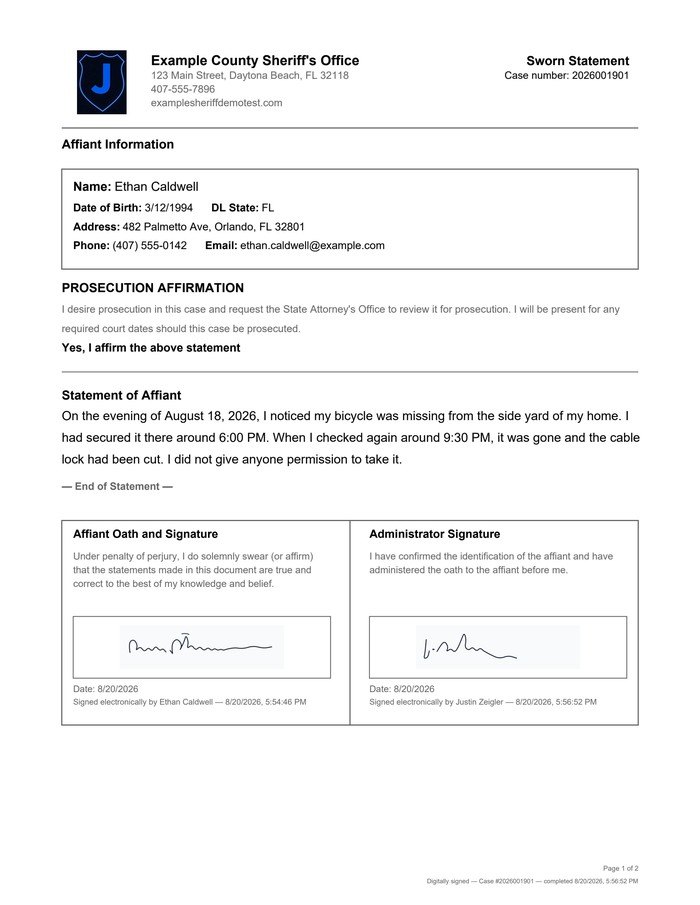
Dual e-signature, sealed the moment both people sign.
The officer sends the statement by email, text, or QR code. The witness writes or dictates it on their own phone, in their own words, using whatever keyboard language the phone already has. Identity comes off the license barcode. The officer reviews it and counter-signs.
The document seals only after both signatures are in, with a tamper-evident PAdES PDF seal that breaks if the file is altered. There are no half-signed drafts left open, and nothing to carry, file, or retype between the scene and the office.
Victim packets
Rights notices and assessments in one guided packet.
Rights notices, lethality assessments, and contact preferences sit in one guided packet instead of a stack of separate forms. The packet uses the same capture, signature, and seal path as a sworn statement, and the affiant can revoke it.
Custom agency forms
Build your own forms in your agency’s branding.
Anything beyond the standard statement can be a form: internal forms, sign-ins, requests. Custom forms carry your agency's branding and go through the same delivery, signature, sealing, retention, and audit trail. Forms are built and branded for you as part of the license.
Online reporting
A public front door with a staff queue behind it.
An agency-branded online reporting page for the reports that don't need an officer on scene: minor theft, vandalism, lost property. Citizens file without creating any account.
Staff work a triage queue instead of a shared inbox, with incident types you control, Person, Vehicle, and Property cards, DL scan, assignment, search, and export. Staff sign in with the same Microsoft Entra account as the rest of Jurat. It is included in the license, and also available on its own — see Pricing.
 Sealed
Approval chains
Approval chains
Send requests for approval.
Route any form through named approvers or groups. Each approver can approve, deny, or send it back, with comments. Delegation covers absences, and reminders keep a request from sitting in someone's queue.
Policy and training
Policy management
Version, assign, and track signed acknowledgments.
Upload the policy PDF or Word file you already use and publish it. Officers acknowledge that version, not last year's rewrite. When counsel or an assessor asks who read the order that applied on a given date, the answer is on file.
Training tracking
Courses, tests, certificates, and sign-in sheets.
Run slide, video, and test courses with certificates and recurring assignments. For a class session, share one link: officers sign in as they arrive and the instructor closes it when the class ends, with no roster to reconcile by hand.
Accreditation prep
Accreditation prep
CFA and others, with proof on file.
Import CFA or other accreditation standards. File proof from the policies, training records, and documents you already keep in Jurat, instead of gathering it from shared drives the week before an assessment.
Run a mock assessment ahead of time, then share a read-only link with the assessor.
Internal Affairs
Internal Affairs
Complaints to findings, with restricted access.
Track a case from intake through allegations, findings, and discipline to closed, with an investigation clock running alongside.
Restricted cases stay hidden from staff who don't have access. Leave the module off if IA already lives in another system — it is on the license either way.
Use of force and pursuit forms
Use of force and pursuit forms
Step-by-step packets with a body diagram.
Walk through the packet one step at a time: the people involved, a body diagram, and a DL scan to fill in identity. Pursuit forms follow the same guided approach.
Use of force packets hold for command review on serious injury or deadly force. Leave the module off if the agency already runs force review somewhere else; the documents still work.
AI report review
AI report review
Draft, review, and revise. The officer accepts.
The officer chooses the sources, such as statements and notes. The draft is built from those sources and checked for gaps and contradictions. The officer revises it.
Nothing enters the report until the officer accepts it, and the AI does not replace the officer's signature on a sworn statement. The agency's admin switches it on or off. It includes a monthly usage limit, pooled across your agency, that you can upgrade.
Search
Search
Find anything by name, case, or plain-language question.
Find any statement, packet, or form by name or case number, or ask in plain language, such as “my open statements from last week.” Search policies and training rosters too.
One site license
Every module is included at $95 per sworn officer, per year.
Priced per officer, not per envelope. Your admin switches on the modules the agency is ready for, and leaves the rest off.